Internal — page framework

Block catalogue

Every block in the templated marketing pages framework, rendered with sample data, plus links to the four reference pages built on it. Author guide: BLOCKS.md.

Sample pages

Each sample is a complete YAML in src/content/pages/. Use as starting templates.

Blocks

hero

Opening block. Title + lead + optional vendor / hero image + optional CTAs.

When: Every page. Integration pages put the vendor logo on the right; persona pages use an illustration; ad landers go image-less.

Show YAML
- type: hero
  eyebrow: Integration
  title: "Aruba Central to NetBox, automated."
  lead: "Bring Aruba Central inventory into NetBox without rebuilding either."
  image: { src: /img/brands/aruba.png, alt: "Aruba logo" }
  cta_primary:
    label: "Talk to us"
    target: "#contact"
    kind: scroll-to-form
Integration

Aruba Central to NetBox, automated.

Bring Aruba Central inventory into NetBox without rebuilding either.

Aruba logo

hero-video

Hero variant with a video embed beneath the title + lead. Powers the outreach pattern.

When: Outreach pages that lead with a recorded walkthrough. Pair with the personalised-note + contact-form two-column row.

Show YAML
- type: hero-video
  eyebrow: "VP of Networks"
  title: "Hey Jack, we prepared this for you..."
  lead: "How Netos turns scattered network and financial data into a single, automated source of truth."
  private_badge: true
  video:
    sources:
      - { src: /media/netos-product-demo-1080.mp4, type: video/mp4 }
    track_token: v_otrchvpn01
Private & Unindexed Page VP of Networks

Hey Jack, we prepared this for you....

How Netos turns scattered network and financial data into a single, automated source of truth, built for the VP of Networks.

logo-bar

Trust strip — a row of vendor / customer / partner logos.

When: Under the hero on integration and use-case pages, or as a quiet proof point higher up than the FAQ.

Show YAML
- type: logo-bar
  title: "Works with the tools you already run"
  logos:
    - { src: /img/brands/aruba.png, alt: "Aruba" }
    - { src: "", alt: "Cisco" }
    - { src: "", alt: "Juniper" }

Works with the tools you already run

Aruba

hero (pair visual)

Hero variant — the right column renders two vendor cards stacked with a connector arrow in between, instead of a single image. Best for integration pages where both vendors are familiar.

When: Integration pages. Use the `pair` field instead of `image`.

Show YAML
- type: hero
  eyebrow: Integration
  title: "Aruba Central to NetBox, automated."
  pair:
    a:
      logo: { src: /img/brands/aruba.png, alt: "Aruba Central" }
      name: "Aruba Central"
    b:
      logo: { src: /img/brands/netbox.svg, alt: "NetBox" }
      name: "NetBox"
    connector_label: "Netos pipeline"
Integration

Aruba Central to NetBox, automated.

Bring Aruba Central inventory into NetBox without rebuilding either.

Aruba Central
NetBox

problem

A 'what's broken today' block. Two-column: heading-left, pain points stacked on the right.

When: Integration / use-case / persona pages. Sets up the solution block that follows.

Show YAML
- type: problem
  title: "Why this is painful today"
  lead: "Most teams still maintain inventory by hand."
  items:
    - "Aruba Central holds the live operational picture; NetBox holds the model. Neither agrees with the other for long."
    - "New site cut-overs introduce devices in Central days or weeks before NetBox catches up."

Why this is painful today

Most teams still maintain inventory by hand.

  • Aruba Central holds the live operational picture; NetBox holds the model. Neither agrees with the other for long.
  • New site cut-overs introduce devices in Central days or weeks before NetBox catches up.
  • Decommissioned devices linger in NetBox until someone notices.

solution

The 'how Netos solves it' counterpart to problem. Same layout, brighter background, check icons.

When: After a problem block. Almost always paired.

Show YAML
- type: solution
  title: "How Netos closes the gap"
  items:
    - "Reads Aruba Central directly through its API. No CSV exports, no scheduled scripts."
    - "Reconciles devices by serial and MAC, so refreshes do not create duplicates."

How Netos closes the gap

  • Reads Aruba Central directly through its API. No CSV exports, no scheduled scripts.
  • Reconciles devices by serial and MAC, so refreshes do not create duplicates.
  • Surfaces a diff before writing, so the first run is review-gated.

problem-solution

Combined problem + solution panel — two side-by-side cards, red ✕ on the left, green ✓ on the right. Replaces using a `problem` block immediately followed by a `solution` block.

When: Integration / use-case pages where the contrast is the whole pitch.

Show YAML
- type: problem-solution
  problem:
    title: "Aruba-to-NetBox is a manual problem"
    items:
      - "Aruba Central and NetBox never quite agree."
  solution:
    title: "Netos closes the gap"
    items:
      - "Reads Aruba Central API; writes NetBox."
What you're stuck with today

Aruba-to-NetBox is a manual problem

Two sources of truth that never quite agree.

  • Aruba Central holds the live picture; NetBox holds the model. Neither agrees for long.
  • Cut-overs reach NetBox days or weeks late.
  • Decommissioned devices linger in NetBox until someone notices.
What changes with Netos

Netos closes the gap

One pipeline doing the reconciliation you have been doing by hand.

  • Reads Aruba Central directly through its API.
  • Reconciles by serial and MAC; no duplicates on refresh.
  • Diff every run, review-gated on the first, auditable thereafter.

vendor-fanout

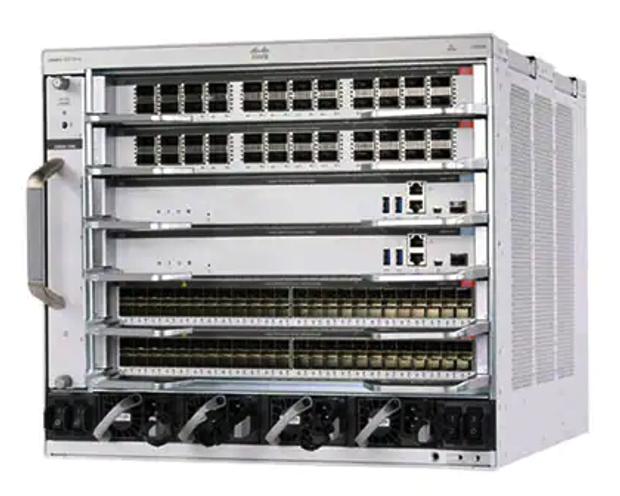
Anchor card at top (vendor photo / hero image), branches fanning out below into 2-8 mini cards. Reads like a simple org chart of decisions or workstreams.

When: Use-case pages where one piece of hardware or product anchors several threads of work (refresh, support, TCO, risk, etc).

Show YAML
- type: vendor-fanout
  title: "What a Catalyst refresh actually decides"
  anchor:
    image: { src: /img/products/cisco-catalyst-9600.png, alt: "Cisco Catalyst" }
    name: "Cisco Catalyst estate"
    caption: "Your fleet today."
  branches:
    - { label: "Consolidate", detail: "Which chassis collapse." }
    - { label: "SmartNet",   detail: "Coverage and renewals." }
    - { label: "TCO",        detail: "CapEx / OpEx horizon." }
    - { label: "Risk",       detail: "EoSL exposure." }

What a Catalyst refresh actually decides

One chassis at the top, four threads of work coming off it.

Cisco Catalyst 9600 series chassis switch

Cisco Catalyst estate

Your fleet today — chassis, line cards, software, support coverage.

Consolidate

Which chassis collapse into newer platforms.

SmartNet

Coverage gaps and renewal optimisation.

TCO

CapEx / OpEx over a multi-year horizon.

Risk

EoSL exposure, board-ready evidence.

bullets

Generic title + items block when neither problem nor solution framing fits.

When: When you need a 'what this gives you' or 'what's included' panel without the problem/solution framing.

Show YAML
- type: bullets
  title: "What this gives you"
  items:
    - "Map Zabbix hosts to NetBox devices automatically"
    - "Reconcile interface state with NetBox cabling"

What this gives you

  • Map Zabbix hosts to NetBox devices automatically
  • Reconcile interface state with NetBox cabling
  • Auto-detect link layer topology from LLDP

outcomes

Buyer-language outcomes block. Same layout as problem/solution, amber tint.

When: Late in the page, before the FAQ. Persona and industry pages especially.

Show YAML
- type: outcomes
  title: "What this changes for you"
  items:
    - "NetBox you can trust as the source of truth, again."
    - "Refresh and lifecycle planning grounded in live data."

What this changes for you

  • NetBox you can trust as the source of truth, again.
  • Refresh and lifecycle planning grounded in live data.
  • Less manual reconciliation work for the team.

what-you-get

Three-column outcome panel: Inputs / Netos does / Outputs. Bigger text than the old four-column layout — drop a column rather than crush the type.

When: Integration and use-case pages — the 'explain it to a buyer who hasn't seen the product' block.

Show YAML
- type: what-you-get
  heading: "What Netos gives the Network Architect"
  supporting_text: "Source of truth, lifecycle, and modelling in one place."
  inputs_label: "What you bring"
  netos_does_label: "What Netos does"
  outputs_label: "What you get"
  inputs: [...]
  netos_does: [...]
  outputs: [...]

What Netos gives the Network Architect

Source of truth, lifecycle, and modelling in one place.

What you bring
  • Existing NetBox
  • Operational data sources
  • Contracts and warranties
What Netos does
  • Reconciles operational reality
  • Layers lifecycle and spend
  • Runs scenario models
What you get
  • NetBox that matches reality
  • Drillable lifecycle horizon
  • Defensible refresh scenarios

workflow

Visual ordered flow. Either a single ordered list of steps, or two phases (Integrate / Operate) side-by-side with up to 3 steps each — the phased form is the default for integration pages.

When: Integration pages and automation-heavy use cases. Phased form makes set-up vs steady-state explicit.

Show YAML
- type: workflow
  title: "How the integration runs"
  lead: "A short set-up, then a steady operational loop."
  phases:
    - label: Integrate
      accent: blue
      steps:
        - { label: "Connect Aruba Central", detail: "Read-only API credentials" }
        - { label: "Map to NetBox", detail: "Sites, roles, types agreed in one session" }
        - { label: "First reconciliation", detail: "Review-gated diff before any writes" }
    - label: Operate
      accent: teal
      steps:
        - { label: "Continuous sync", detail: "Matches by serial / MAC" }
        - { label: "Exception review", detail: "Only ambiguous records need a human" }
        - { label: "Lifecycle reporting", detail: "Coverage, drift, warranty horizon" }

How the integration runs

A short set-up, then a steady operational loop.

Integrate
  1. 1

    Connect Aruba Central

    Read-only API credentials, scoped to the tenants you care about.

  2. 2

    Map to NetBox

    Site, role, and device-type mappings agreed in a single review session.

  3. 3

    First reconciliation

    Diff produced and signed off before anything is written to NetBox.

Operate
  1. 1

    Continuous sync

    Pulls inventory on your schedule; matches by serial / MAC.

  2. 2

    Exception review

    Only unmatched or ambiguous records need a human eye.

  3. 3

    Lifecycle reporting

    Coverage, drift, and warranty horizon surfaced back to network and finance.

before-after

Single combined Before / After box. Red cross on the left, green tick on the right, one row per pair. Keep each line tight so it doesn't wrap.

When: When there is a clear 'manual today, automated with Netos' contrast.

Show YAML
- type: before-after
  heading: "What changes for the team"
  intro: "The work that used to land every Monday morning."
  pairs:
    - { before: "CSV export, manual diff", after: "Continuous reconciliation" }
    - { before: "Devices days late", after: "Same-day arrival" }

What changes for the team

The work that used to land every Monday morning.

Before Netos
After Netos
  • CSV export, manual diff
    Continuous reconciliation
  • Devices in NetBox days late
    Same-day arrival
  • Warranty data in a spreadsheet
    Warranty data on the device record

screenshots

Gallery of product screenshots laid out on a 6-column grid. Each item picks a `size` — `small` (charts), `medium` (default), `large`, or `full` (full row). Missing assets render a labelled placeholder.

When: Any page where you can ground claims in real UI. Pair `full` browser shots with `small` chart tiles for variety.

Show YAML
- type: screenshots
  title: "What it looks like"
  items:
    - image: { src: "", alt: "Full-width pipeline run summary." }
      title: "Pipeline run"
      caption: "Auditable diff before NetBox is touched."
      size: full
    - image: { src: "", alt: "Coverage chart per site." }
      title: "Coverage chart"
      size: small
    - image: { src: "", alt: "Reconciliation review screen." }
      title: "Reconciliation review"
      size: large

What it looks like

Pipeline run

Auditable diff before NetBox is touched.

Reconciliation review

Matches auto-approved; exceptions wait for a human.

Coverage per site

Quick health check at a glance.

Coverage dashboard

Drillable to the device record.

Warranty horizon

Renewals visible 24 months out.

integration-pair

Two vendor cards side-by-side with a Netos connector between them.

When: Integration pages where both vendors are familiar. Use alongside or instead of the hero image.

Show YAML
- type: integration-pair
  a:
    logo: { src: /img/brands/aruba.png, alt: "Aruba logo" }
    name: "Aruba Central"
  b:
    logo: { src: "", alt: "NetBox" }
    name: "NetBox"
Aruba logo

Aruba Central

Operational source of truth.

Netos data pipeline
NetBox logo

NetBox

Modelled source of truth.

faq

Q&A list. Two-column: heading-left (sticky on desktop), expandable items on the right.

When: SEO-indexed pages. Set seo.faqSchema: true at the page level to emit JSON-LD.

Show YAML
- type: faq
  title: "Common questions"
  items:
    - q: "Does Netos write back to Aruba Central?"
      a: "No. The pipeline reads from Aruba and writes to NetBox."

Common questions

Does Netos write back to Aruba Central?

No. The pipeline reads from Aruba and writes to NetBox.

What permissions does Netos need?

Read-only API access scoped to the tenants in question.

How quickly can we go live?

Most customers run their first reconciliation within a week of credentials being available.

cta-row

Standalone CTA strip on a brand-accent background.

When: Between major sections when you want a CTA without committing to a full form.

Show YAML
- type: cta-row
  title: "Want a worked example for your estate?"
  cta_primary:
    label: "Schedule a walkthrough"
    target: "/schedule-demo/"
    kind: internal

Want a worked example for your estate?

Share the rough size and the vendors in play; we will send back a worked model.

personalised-note

Sales note card with a [first name] token. Renders the literal placeholder if no recipient is set.

When: Outreach and use-case-personalised pages. Usually rendered as the two_column_companion of a contact-form.

Show YAML
- type: personalised-note
  from:
    name: "Jack Sheridan"
    role: "VP of Sales, Netos"
  greeting_template: "Hi [first name],"
  body:
    - "I put together a short walkthrough with you in mind..."
    - "If any of it resonates, drop a line on the right."

A short note

From the Netos team to you

Hi [first name],

I put together a short walkthrough with you in mind, specifically around the challenges most VPs of Networks we speak to are facing right now.

If any of it resonates, drop a line on the right and we will set up a quick call.

Cheers,
Jack Sheridan
VP of Sales, Netos

quote

Single pull-quote with attribution and optional avatar.

When: Only when the quote is real and approved. Never fabricate testimonials.

Show YAML
- type: quote
  quote: "Netos gave us a NetBox we can trust again."
  attribution:
    name: "(approved customer name)"
    role: "(role)"
    company: "(company)"
Sample pull-quote — replace with a real, approved customer quote before publishing.

Customer name

Role, Company

contact-form

Embedded form posting to /api/contact. Fixed field set; pages choose intent + framing. Pass a `two_column_companion` to render either a personalised note or a meeting agenda on the side.

When: Bottom of almost every page. Add `two_column_companion: { type: meeting-agenda, ... }` on integration pages to sketch the demo session alongside the form.

Show YAML
- type: contact-form
  intent: integration-aruba-central-to-netbox
  title: "Talk to us about your Aruba estate"
  lead: "Drop a line and we will send a worked example."
  two_column_companion:
    type: meeting-agenda
    title: "A 30-minute working session"
    items:
      - { title: "Estate snapshot", minutes: 5 }
      - { title: "Reconciliation walk-through", minutes: 10 }
      - { title: "Field map", minutes: 10 }
      - { title: "Next steps", minutes: 5 }
What to expect

A 30-minute working session

Practical, not a sales pitch.

  1. 1

    Estate snapshot

    5 min

    Tenants, sites, and devices; what your NetBox looks like.

  2. 2

    Reconciliation walk-through

    10 min

    What a Netos diff would surface on day one.

  3. 3

    Field map and lifecycle layer

    10 min

    Where Aruba fields land in NetBox, plus warranty.

  4. 4

    Next steps

    5 min

    What a pilot looks like and rough timelines.

We will follow up with a written summary within one business day.

Talk to us about your Aruba estate

Drop a line and we will send a worked example for an estate the shape of yours.

We'll only use your details to reply.

prose

Free-form text body. Paragraphs split on blank lines; minimal — escape hatch only.

When: Niche explanations that do not fit any structured block. If you reach for prose twice in one page, propose a new block instead.

Show YAML
- type: prose
  title: "Notes"
  body: |
    A paragraph of plain text.

    A second paragraph after a blank line.

Notes

A paragraph of plain text used when no structured block fits.

A second paragraph after a blank line. Use sparingly — structured blocks render better and are easier to maintain.

Authoring

  1. Pick a kind (see BLOCKS.md section 1).
  2. Copy a sample YAML from src/content/pages/ and rename.
  3. Override meta.path if you want a non-default URL placement.
  4. Set meta.status: published when ready, commit, push, run bin/deploy prod.